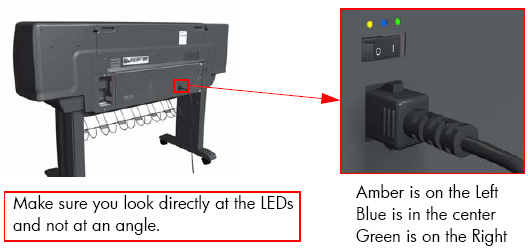
Using the Power Switch LEDs to Troubleshoot
In certain circumstances, the LEDs located on top of the power switch (located at the rear of the Printer) can help to troubleshoot the Printer. The LEDs can either be ON or Off and using different combinations can indicate different problems:
1. When only the Amber LED is On:
- The Printer has been switched Off from the Front Panel (after having
pressed the On/Off button).
- The Power Supply Unit only delivers a 5 V "Standby"; power that is
needed to restart the Printer after the Front Panel On/Off button is
pressed (the Formatter/Main PCA will initiate the Printer to start).
2. When the Blue LED is On: Deliver standard "ATX" power for the Electronics Module PCAs (+12V, +5V, -5V, -12V, etc...). All the functions of the Electronics Module are fully operational (EWS, etc...).
3. When the Green LED is On: Deliver "analog" 24V and 42V to enable printing.
The Printer monitors and reports different signals: PSU fan issues, 24V and 42V delivery failures (specific System Error reported pointing to PSU failure).
|
PSU
Blue
LED
Status
|
PSU
Green
LED
Status
|
Left LED (on
Front Panel)
Status
|
Printer Status
|
|
ON
|
OFF
|
Red (Front Panel
Black)
|
Standby (with Embedded Web
Server up and running)
|
|
ON
|
OFF
|
Green (flashing)
|
Initializing
|
|
ON
|
ON
|
Green
|
Ready (but not printing)
|
|
ON
|
ON
|
Green
|
Printing or preparing to print
|
|
OFF
|
ON
|
Any
|
Not possible
|
|
ON
|
ON
|
Red (Front Panel
Black)
|
Not possible
|